
Table of content
Introduction
What is PingFederate?
Key Features of PingFederate
Understanding PingFederate Architecture
PingFederate Installation and Setup
Creating Connections
Best Practices for PingFederate
Career Path and Learning Resources
Conclusion
Introduction
PingFederate is an excellent place to begin in case it is your first experience with Identity and Access Management (IAM). It is an effective federation server which allows organizations to safely handle user authentication. It also allows Single Sign-on (SSO) within numerous systems and applications. Users can use PingFederate and authenticate to multiple cloud, mobile, or on-premise applications by not re-entering their credentials after a successful authentication.
This is a beginner guide that is intended to assist students and new attendees to the field in terms of learning the basics of PingFederate. We will discuss the main ideas, key elements, and their integration into the broader IAM environment. You will get to know the way PingFederate makes it easier to have a secure communication between identity providers and service providers to provide easy and secure access to users. By the conclusion of this guide, you will know how PingFederate works nd why it is such a popular solution in the enterprise, and how its mastery can lead to open opportunities in the field of cybersecurity, identity management, and cloud security.
What is PingFederate?
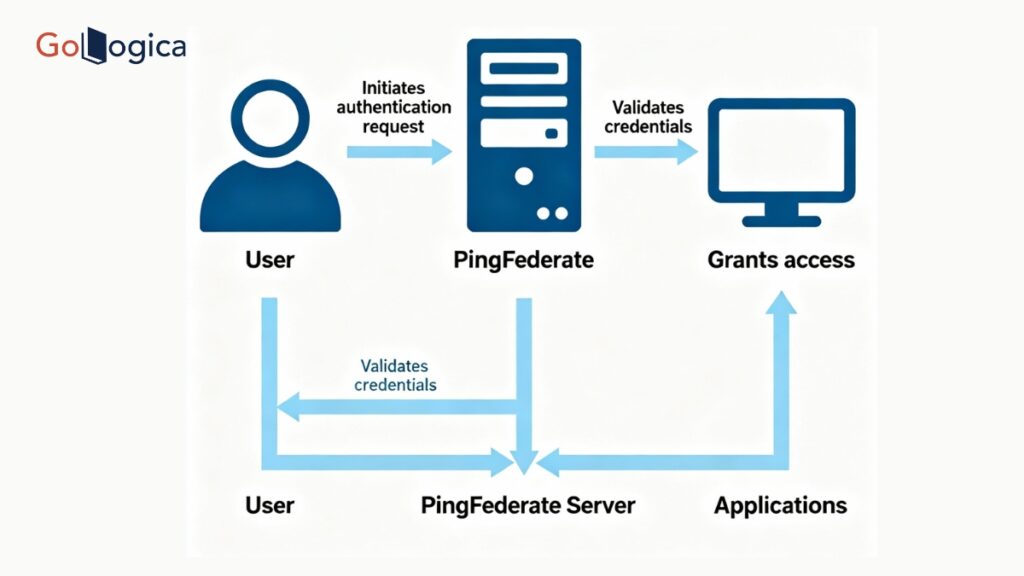
PingFederate is an identity federation server developed by Ping Identity at the enterprise level. It offers safe user authentication and single sign-on (SSO) between applications, domains, and systems. Consider it a bridge between identity providers, where user credentials exist, and service providers, which are the apps users require. The bridge will allow users to sign in and move freely across services.
PingFederate implements industry standard protocols including SAML, OAuth, OpenID Connect, and WS-Federation. It enhances the user experience, password fatigue, and improves security by centralizing authentication to support security. Businesses rely on it to connect their internal systems of identity to third-party services in a safe way. The need to have the employees logins integrated with cloud applications, such as Salesforce, or to have the customer accounts integrated with partner applications is no exception, and PingFederate simplifies the process with highly configured options and customized authentication provision. It is an essential remedy for those organizations that desire efficient, scalable, and secure access management IAM in the current connected digital world.
Key Features of PingFederate
PingFederate is a strong technology with a large reputation in identity federation and Single Sign-On (SSO). The most important features are elaborated below:
Single Sign-On (SSO):
PingFederate also allows users to sign in and use all their applications. This eliminates redundant logins, enhances productivity, and ensures systems are safe.
Multiple Protocols:
The solution is compatible with numerous cloud and on-premises applications, as it supports key identity protocols, including SAML, OAuth, OpenShift Connect, and WS-Federation.
Federation and Identity Bridging:
PingFederate can connect various identity systems to bring about secure authentication and data transfer between identity providers and service providers, across corporate borders.
Multi-Factor Authentication (MFA) Delivery:
The platform can be easily connected with MFA solutions, which add an extra security layer that prevents accounts even in case of password compromise.
Centralized Access Management:
The administrators manage authentication policies, establish connections, and keep track of user access through one console, which is easier to manage across numerous systems.
Extensibility and Customization:
API and plug-in support enable the organizations to customise authentication flows, user attributes, and integration logic to the unique business requirements.
High Scalability and performance:
PingFederate is designed to support large-scale authentication operations and is efficient to run in enterprise workloads without failure to perform at global levels.
Secure Token Services (STS):
The integrated STS securely issues, validates, and exchanges tokens to achieve trust between the identity and service provider.
Extensive Logging and Surveillance:
The user activity is recorded and tracked using detailed logging/monitoring tools, and assistance is provided in troubleshooting.
Understanding PingFederate Architecture
PingFederate architecture provides secure, seamless, and scalable identity federation between varied applications and domains. It serves as an intermediary between the Identity Providers (IdPs) and the Service Providers (SPs), and user authentication and authorization can occur in a short time and in a secure manner without the user needing to log in more than once.
The most important parts of PingFederate architecture are:
Identity Provider (IdP):
The IdP authenticates the users and provides security tokens which have information about the user identity. It authenticates credentials and issues assertions, e.g. SAML tokens that prove the identity of the user to the service provider.
Service Provider (SP):
The SP is a service or an application that the user desires to access. It trusts the IDP to do authentication. When a user logs on, he or she is redirected to the IDP, where the SP authenticates the token and admits the user when an authentic token is sent.
Federation Metadata:
Metadata establishes the trust between the IDP and SP. It enumerates the destinations, certifications, and protocols, which are standard and secure in terms of communication between both entities.
Authentication Adapters and Sources:
PingFederate can support any of the following authentication sources, DAP directories, Active Directory, or any other identity systems. Adapters combine these mechanisms, providing flexibility in the verification of users.
Token Processors and Generators:
These elements generate and authenticate tokens. Security tokens are issued to the user by token generators upon successful login, and they are authenticated by token processors of external systems.
Administrative Console
PingFederate features a user-friendly, administrative web-based interface to manage configuration, configure connections, establish authentication policies, and track activity; all in a single interface.
Safe Ways of Communication
IDP-SP communications are all secured by such protocols as HTTPS, and data is not lost or leaked.
PingFederate Installation and Setup
Setting up PingFederate is a relatively easy task, meaning you can quickly pull together an environment to enable secure identity federation. Even if you are just getting started with learning for the first time or you are in the process of building a server for professional use, if you follow the relevant English steps, you should have a relatively simple installation and configuration process.
System Requirements and Prerequisites:
Before starting a PingFederate instance, verify that your system meets the requirements. PingFederate works on both Windows and Linux and requires that a supported Java Runtime Environment (JRE) be present. It is best to have at least 4 GB of RAM, a current browser, and administrative rights. You should also verify that important ports are available if they are needed, such as ports 9999 (admin console) and 9031 (runtime).
Download PingFederate:
Go to the official Ping Identity website and download the latest version of PingFederate. The download package will usually include everything necessary, including files, documentation, and installation scripts.
Extract and Install:
Once you have downloaded PingFederate, you can proceed to extract the installation package to your preferred location. On Windows, you can either run the installer that is provided in the downloaded package or you can run the batch file that’s also included. On Linux, extract the .tar.gz file and set up your install by defining environment variables (for example, JAVA_HOME, etc.).
At this point, you have successfully installed the PingFederate runtime and administrative components.
To continue, start the server that you’ve just installed.
Starting the Server:
Project forwards, to start your PingFederate server, run the following commands after extracting the directory:
Initial Setup:
During the initial installation, you will generate an administrator password and specify the minimum server characteristics. The installer will help you set up:
- HTTPS certificates for secure communication
- Runtime server settings
- Logging and monitoring option
- The guided setup should simplify the process for an average new user.
Connecting to User Data Stores:
Through PingFederate, you can connect to user data sources such as LDAP, Active Directory, or SQL databases. Connections to data stores are fundamental to authenticating users and retrieving identity attributes during a user authentication event.
Creating a Federation Connection:
After you configure the basics, you can configure either an Identity Provider (IdP) connection or a Service Provider (SP) connection and their associated components:
- Sharing metadata files between the IdP and SP
- Declaring which protocols are supported, such as SAML, OAuth, or OpenID Connect
- Attribute mapping of user identity for Single Sign-On (SSO)
- That framework will allow connected systems to communicate securely.
Tests:
After you have completed the installation and connection setup, test your configuration with a user logging in through the IDP and gain access to the SP application. The PingFederate Admin Console provides testing tools and logs if you run into problems in the authentication process.
Production:
Once you confirm that everything is working correctly in your test setup, you will complete your deployment by:
- Enabling SSL for encryption
- Setting up clustering for scaling
- Implementing advanced security and session management options
Best Practices for PingFederate
Effective use of PingFederate requires making sure to follow several important best practices to ensure security, reliability, and performance across the identity federation.
Plan Your Architecture:
Before you deploy PingFederate, determine your Identity Provider (IdP) and Service Provider (SP) roles, protocols (SAML, OAuth, OpenID Connect), and data flow to avoid significant configuration changes later.
Use Secure Connections:
Utilize HTTPS (SSL/TLS) for all communication involving login or sensitive token data to secure your users’ data.
Implement Multi-Factor Authentication (MFA):
You should implement MFA to add additional security layers to verify users and reduce unauthorized access risk.
Update Systems Regularly:
You should regularly update PingFederate and apply the latest security patches and performance upgrades to your instance.
Password Management:
Make sure your administrator accounts have strong passwords, and maintain valid SSL certificates that are regularly updated.
High Availability:
Consider clustering with load balancing and failover options to maintain high availability.
Limit Administrative Access:
Apply role-based access control (RBAC) to your PingFederate instance. Permissions should only be granted to trusted administrators, and even then, only as necessary.
Monitor and Log:
Enable logging detail and use log aggregation tools to quickly detect and respond to issues.
Test and Backup:
It is also recommended that you test your IdP/SP connections frequently. Secure backups of configurations and keys should also be stored in a safe place.

Career Path and Learning Resources
Identity and Access Management (IAM), Cybersecurity, and Cloud Security are all areas of work that can be achieved with the help of PingFederate. It is possible to start as an IAM Analyst, SSO Specialist, or Security Administrator, and then move to an IAM Architect or Identity Governance Expert. Learners may approach the official documentation of Ping Identity, study certified training programs in Ping Identity University, or participate in practical training programs to develop their skills. Other materials, such as community forums, YouTube tutorials, and IAM books on protocols like SAML and OAuth, also contribute to content. The art of PingFederate will provide opportunities in the global secure digital identity management.
Conclusion
PingFederate is an enterprise-wide solution with the strength and capability to secure user authentication, Single Sign-On (SSO), and identity federation. To the novice, its architecture features and setup process can give a solid foundation for Identity and Access Management (IAM). Having studied the ways PingFederate connects people with the various applications flawlessly, you will be in a great position to have valuable skills that cannot be ignored in the current IT world that is security-conscious. Under the guidance of the appropriate experts and hands-on training on sites such as GoLogica, future workers can be assured of gaining the skills to be educated in PingFederate and progress their careers in the fields of cybersecurity and cloud integration, as well as enterprise identity management.